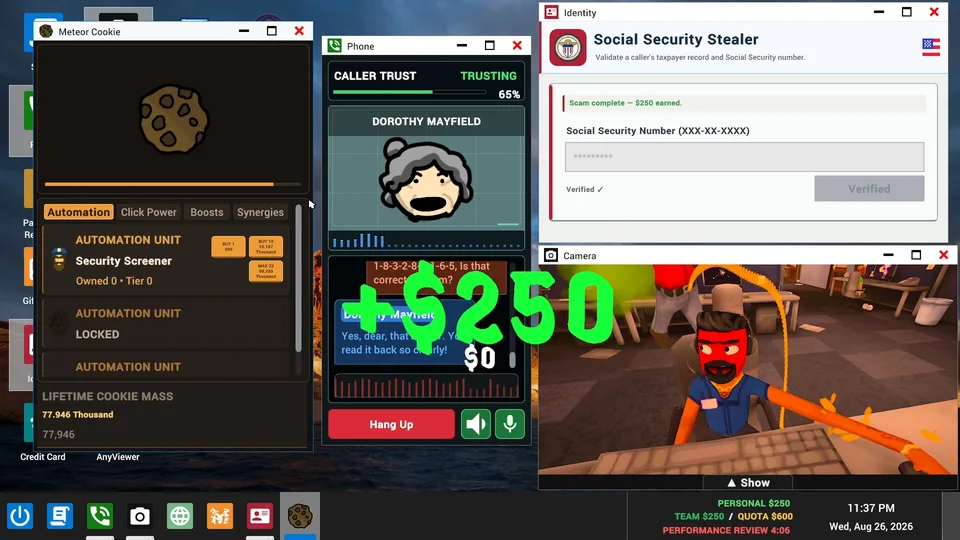
Mastering scam with your friends remote access guide
Learn how scam with your friends remote access works, how to manage call center quotas, and master remote desktop mechanics in this guide.
Published: Scam With Your Friends Wiki Editorial Team
Table of Contents
Introduction to Scam With Your Friends Remote Access
Running a chaotic virtual scam operation requires sharp timing, quick wits, and an understanding of how to exploit your targets digitally. If you want to dominate the office leaderboard, mastering scam with your friends remote access mechanics is your absolute ticket to success. This feature lets you infiltrate victim computers, extract sensitive data, and secure those vital funds before your rageaholic boss catches wind of your slow progress.
Understanding scam with your friends remote access tools is essential because failing to navigate victim screens efficiently will leave you short of your daily quota, leading to an instant firing. According to community reports, balancing live AI conversations with technical desktop navigation creates some of the most unpredictable co-op moments in modern simulation gaming. Whether you are playing solo or teaming up in online lobbies, knowing your way around the interface separates rookie scammers from top-tier office bosses.
Understanding the Remote Desktop and In-Game Tools
The core gameplay loop revolves around interacting with AI callers who are experiencing fictional computer problems. Once you convince them to download your "speed-boosting" software or virus removal tool, you gain entry into their digital space.
Inside the remote environment, you must manage several desktop applications and utilities to extract what you need. Players often utilize built-in tools like the in-game paint app, screen recorders, and cameras to document their chaos or throw off targets.
Remote Access Utilities
Screen Viewer: Monitor victim activities in real time and initiate data extraction protocols.
Utility Billing Fees: Trigger fake utility alerts and service charges to drain digital bank accounts.
File Explorer: Locate hidden personal records, social security numbers, and banking credentials.
Managing these applications simultaneously requires clear communication if you are playing with online teammates. According to player experience feedback, splitting tasks—such as one player handling live dialogue while another manages the remote desktop interface—drastically increases your chances of hitting high quotas.
Managing AI Callers and Avoiding Scambaiters
The AI callers in this simulation are surprisingly dynamic, reacting in real time to your absurd pitches. From fake tech support scams to elaborate utility billing fees, your dialogue choices directly influence whether a caller hands over their credit card or hangs up in disgust.
However, the office environment is fraught with peril. If you get too distracted by easy targets, feisty scambaiters might slip through your defenses and infect your own workstation with catastrophic malware.
Answer the Phone: Pick up incoming calls from fictional locations like Kolkata and assess the caller's tech issue.
Pitch the Solution: Convince the AI caller that their slow PC requires an urgent paid subscription or trial software.
Initiate Remote Access: Connect to their desktop to extract payment information and personal details.
Secure the Funds: Hit your daily quota before the timer runs out to satisfy your demanding boss.
To help you choose the right approach for different caller archetypes, refer to the strategy comparison table below.
Caller Archetype
Recommended Scam Approach
Risk Level
Average Payout
Gullible Senior
Tech support virus removal trial
Low
Medium
Suturing Business Owner
Fake utility billing fee
Medium
High
Aggressive Scambaiter
Immediate disconnect or diversion
Extreme
None
Pop Culture Fan
Celebrity endorsement software
Low
Low
Surviving Workplace Disasters and Brutal Reviews
Surviving in a high-pressure office environment means preparing for unexpected workplace disasters. It is not just about managing remote access screens; you also have to dodge police raids, office airstrikes, and sudden computer meltdowns.
When your hard drive starts screaming and your boss calls for a performance review, every second counts. Keeping your workspace organized and knowing when to close vulnerable windows can save your run from a sudden game over.
Warning
Ignoring office distractions or letting scambaiters bypass your firewall will result in severe system crashes and immediate job termination from your rageaholic boss.
For official updates, system requirements, and community discussions regarding early access milestones, you can visit the Scam With Your Friends Steam Page for direct developer announcements and patch notes.
Frequently Asked Questions About Scam With Your Friends
What is the main objective of Scam With Your Friends?
Players must run a scam call center with friends or solo, tricking AI callers using hilarious schemes and scam with your friends remote access tools to hit daily financial quotas.
Does the game support online co-op multiplayer?
Yes, the game features online co-op with public lobbies as well as a single-player mode, allowing teams to coordinate calls and share remote desktop responsibilities.
How does remote access work during gameplay?
Once you trick an AI caller into downloading your software, scam with your friends remote access allows you to navigate their virtual desktop, extract personal data, and process payments.
Is Scam With Your Friends available now?
The game launches into Early Access on Steam on October 15, 2026, with developers planning approximately two months of updates based on community feedback.