Mastering the Art of Scam With Your Friends Live Stream
Discover how to run an epic scam with your friends live stream. Learn co-op call center strategies, AI dialogue tricks, and funny moments.
Published: Scam With Your Friends Wiki Editorial Team
Table of Contents
Introduction to Cooperative Call Center Chaos
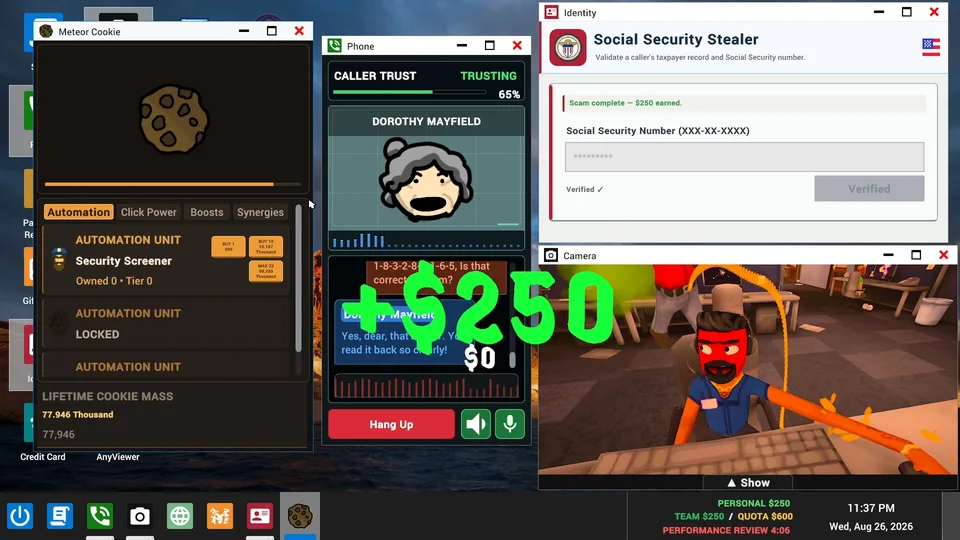
If you have ever wanted to orchestrate a hilarious scam with your friends live stream, the simulation genre has finally delivered the ultimate playground. Understanding how to manage chaotic office environments and funny AI dialogues is essential for keeping viewers entertained while you dodge ruthless performance reviews.
Whether you are coordinating crypto schemes or remote-accessing victim computers on your scam with your friends live stream, teamwork is the only thing standing between you and getting fired by your rageaholic boss. Below, we break down everything you need to know about setting up sessions, surviving scambaiters, and maximizing your broadcast engagement.
Setting Up Your Scam Call Center Operation
Running a successful operation requires dividing labor efficiently among your co-op partners. While one player handles crypto pitches, another might be dealing with computer viruses or tech support roleplay.
According to player experience reports from early community sessions, communication breakdowns are the primary reason call centers fail their daily quotas. Establishing clear roles before going live prevents your team from talking over each other during critical phone calls.
Pitch Specialist
Focuses on high-value AI targets using viral coin names and fake investment opportunities to secure massive payouts.
Tech Support Agent
Manages virus removal simulations and remote computer access requests, extracting credit card info under the guise of security.
Compliance Officer
Monitors the office floor for incoming scambaiters, police raids, and workplace disasters that threaten your team's survival.
Top Strategies for Dealing With AI Callers
The core of the game revolves around dynamic AI conversations that react in real-time to your wild pitches. Mastering these interactions takes practice, especially when callers push back against ridiculous demands.
Community reports indicate that matching the tone of stubborn callers or leaning into absurd roleplay scenarios drastically increases your success rate. Here is a quick reference table comparing different caller archetypes and effective engagement approaches:
Caller Archetype
Difficulty
Recommended Approach
Potential Risk
Wealthy Skeptic
High
Appeal to massive financial gains and viral trends
Immediate hang-up or verbal abuse
Confused Senior
Low
Maintain polite tech support persona
Lengthy dialogue with low initial payout
Aggressive Scambaiter
Extreme
Divert attention immediately or terminate call
Catastrophic computer virus installation
Sci-Fi Commander
Medium
Play along with military or space protocols
Escalated identity verification demands
Surviving Boss Reviews and Workplace Disasters
Meeting your daily quota is only half the battle. At the end of every workday, your rageaholic boss evaluates your performance based on total revenue generated and operational efficiency.
Failing to meet quotas results in immediate termination or brutal tongue-lashing animations. To ensure your team survives performance reviews, prioritize high-yield targets and avoid getting bogged down by low-paying, stubborn AI callers.
Assign Department Roles: Divide tasks between crypto scams, virus cleanups, and tax fraud simulations.
Monitor Quota Meters: Keep an eye on earnings throughout the workday to avoid last-minute panic.
Screen Incoming Calls: Drop low-value or hostile AI callers before wasting valuable session time.
Prepare for Audits: Ensure all fictional credit card numbers and fake gift card codes are logged accurately.
Engaging Your Audience on Stream
Broadcasting your sessions adds an entirely new layer of unpredictability. Viewers love watching the chaos unfold when AI callers reject bizarre pitches or when teammates accidentally leak sensitive information to undercover scambaiters.
To enhance your broadcast, consider setting up custom JSON personalities or exploring the Steam Workshop for community-created mods. You can check out official updates and community hubs directly on the Steam Store Page for Scam With Your Friends.
Test your microphone levels and co-op audio channels before going live.
Familiarize yourself with in-game remote access tools and paint applications.
Plan backup jokes or roleplay scenarios for when AI callers go off script.
Monitor chat reactions to adjust the absurdity of your scam pitches on the fly.
Frequently Asked Questions
What platforms support Scam With Your Friends?
The game is available on PC via Steam, supporting both single-player modes and online co-op multiplayer sessions.
Can I customize AI caller personalities for my stream?
Yes, the game features heavy moddability, allowing players to create custom personalities through JSON files and voice cloning WAV files.
How do I avoid getting scambaiters on my live stream?
You must stay focused during calls and listen closely to caller dialogue cues to identify scambaiters before they infect your office computers with viruses.
Is a broadband internet connection required to play?
Yes, an active broadband internet connection is required to support real-time AI generation and online cooperative multiplayer features.