Mastering the Scam With Your Friends Map and Layout
Master the scam with your friends map layout, office workstations, and desktop camera tools to survive daily quotas and workplace hazards together.
Published: Scam With Your Friends Wiki Editorial Team
Table of Contents
Understanding the Scam With Your Friends Map and Shared Office
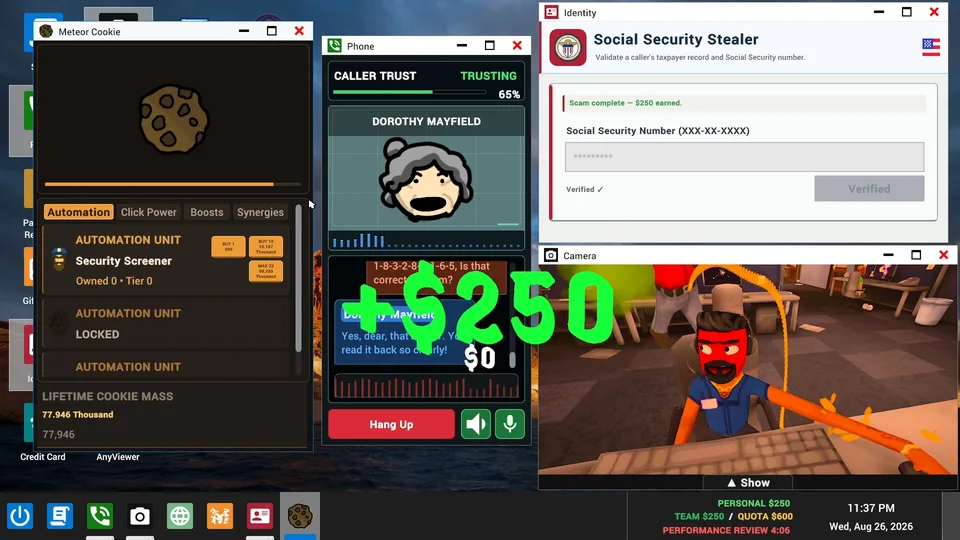
Navigating the workplace layout efficiently can make or break your run in JakeHub's latest indie hit. When you first dive into the scam with your friends map, understanding your physical surroundings and desktop tools is essential for survival. This guide breaks down everything you need to know about the office environment, workstation setup, and managing chaotic workplace disasters.
The primary environment features a shared call-center floor where multiple player characters sit side-by-side at individual desks. According to community reports and early gameplay breakdowns, orienting yourself using visible landmarks is crucial for team communication. Whether you are coordinating tasks or warning teammates about incoming hazards, knowing your exact location on the scam with your friends map saves valuable seconds during high-pressure shifts.
Area / Tool
Primary Function
Key Interaction
Shared Floor
Visual navigation and team positioning
Look for desks and computers to establish reference points.
Simulated Desktop
Main workstation interface
Run applications like Phone, Camera, and remote-access tools.
Camera App
Monitoring the surrounding room
Watch office activity and fellow player movements in real time.
Workplace Hazards
Random event interruptions
Manage computer viruses, police raids, and productivity quotas.
Workstation Layout and Desktop Applications
Your primary workspace is a simulated desktop environment designed to mimic a real corporate office. Players must balance actual in-game work tasks while keeping an eye on the physical room around them. Managing your time between terminal operations and environmental awareness prevents costly mistakes that lead to failing your daily quota.
According to player experience and community guides, the desktop interface houses several critical applications. The Phone app manages incoming calls from fictional AI callers, while remote-access tools let you dig into personal files. To keep track of what is happening outside your immediate screen, opening the Camera application is standard procedure for experienced players.
Establish a Landmark: Locate a recognizable desk or computer on the shared floor to guide your teammates.
Open the Phone App: Access your primary calling interface on the simulated desktop to begin taking calls.
Launch the Camera: Check the office feed to monitor surrounding characters and physical room changes.
Communicate Clearly: Describe visible office landmarks to your team so everyone stays aligned during chaotic shifts.
Return to Work: Quickly refocus on your terminal tasks to ensure you meet your daily financial quota.
Navigating Workplace Hazards and Daily Quotas
Working in a high-stress call-center environment means dealing with much more than just demanding callers. Run-based progression introduces increasingly chaotic workdays, bringing fresh scams and unexpected disasters. If your team fails to hit the daily quota, management will not hesitate to fire you, ending your current run immediately.
Surviving these shifts requires constant vigilance against sudden disruptions. Based on community feedback, hazards range from minor computer viruses to extreme events like police raids and air strikes. Scambaiters also pose a constant threat to your system integrity.
Warning
Workplace Disasters: Random events such as malware infections, police interventions, and hostile scambaiters can disrupt your workstation without warning. Always notify your team immediately when an interruption occurs.
Essential Office Navigation Strategies
Developing a reliable routine helps mitigate the overwhelming chaos of late-game shifts. When multiple disasters trigger simultaneously, panic is your worst enemy. Establishing clear division of labor and communication protocols keeps your team running efficiently through every challenge.
Utilize the comparative breakdown below to understand how different interface elements impact your overall workflow and survival strategy during intensive shifts.
Strategy Component
Low-Pressure Shifts
High-Pressure Shifts
Desktop Focus
Prioritize deep diving into AI caller files.
Balance quick application toggling with room checks.
Camera Usage
Occasional checks for spatial awareness.
Constant monitoring for sudden office hazards or raids.
Team Communication
Casual coordination and task sharing.
Precise landmark descriptions and urgent warnings.
Quota Management
Steady progression toward daily goals.
Emergency multitasking to avoid getting fired.
Tip
Workflow Balance: Alternating quickly between terminal tasks and room observation prevents lingering office distractions from ruining your quota progress.
Frequently Asked Questions
What is the main purpose of the Camera app on the scam with your friends map?
The Camera application allows you to view the surrounding call-center room and monitor other player characters directly from your simulated desktop interface, helping you stay aware of both digital and physical surroundings.
How do daily quotas affect gameplay progression?
Daily quotas drive the run-based progression system. Failing to reach your required quota before the end of the workday results in getting fired, which concludes your current game run.
What kind of workplace hazards can interrupt my shift?
Players must watch out for various random disasters, including computer viruses, police raids, air strikes, and aggressive scambaiters attempting to compromise office security.